Webinar 2: Tactile Graphics Series (APH): Explore & Use the Tactile Graphic Image Library
Presented on Tuesday, 14th September 2021

Presented on Tuesday, 14th September 2021
Number of Participants: 33
Number of Respondents: 7
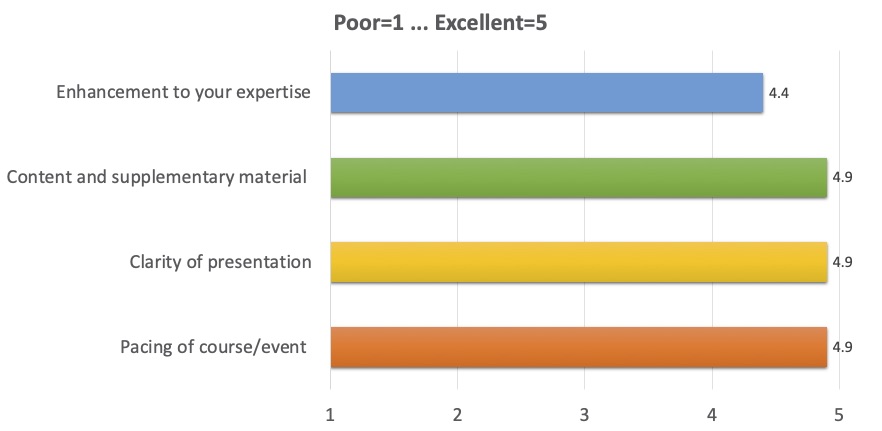
Show colleagues how to use the library in various schools.
I intend to get some of the software programmes down loaded onto the computer and explore APH.
Will practice using the site when time allows.
Approach tactile graphics with a greater sense of confidence.
Try using inkscape.
Use TGIL and Inkscape, and show schools and colleagues how to use them.
Start to use the free online drawing package that was demonstrated. Research for diagrams on Tactile Graphics.
Websites shared.
I enjoyed the webinar but I suppose I enjoyed watching the part with where you could adapt images in Inkscape.
Clear instructions.
Sally was very easy to listen to; explaining everything clearly, and with great enthusiasm.
Enjoy it all.
So much useful information. Will really save time and improve quality of resources for students.
The pace of the training was very good. Explanations were clear and answers to questions were very helpful.
Explain it more simply for people who may have no experience with designing tactile graphics, i.e. how do you convert it to a tactile graphic from the pictures?
As someone else said during the webinar - I am glad it was recorded. There was a lot covered and I am looking forward to revisiting everything covered.
I can't think of anything. Very glad it was recorded and that we can watch it again as and when we need to.
SSC Website: 2
Line manager: 2
SSC direct email: 2
VI Forum: 1
I am always interested in how to best use technology to support pupils.
A basic overview of some common eye conditions for new (and old!) staff
CVI
How would you rate the webinar technology? 4.7/5

Opt out of Google Analytics cookies · Add/Update/Remove Your Contact Details · Privacy
©2021 Scottish Sensory Centre, Edinburgh