New Year, New Versions, New Features
Presented on Tuesday, 12th January 2021

Presented on Tuesday, 12th January 2021
Number of Participants: 19
Number of Respondents: 11
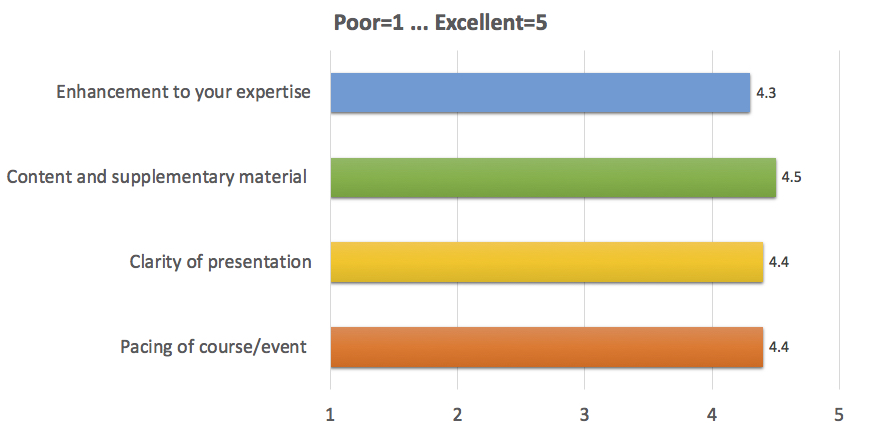
Be able to give more accurate advice to staff about software features and updates.
Follow up with the rest of the service. Look into the glasses.
Further research into these innovations and possible funding sources. Share my learning with colleagues, staff and parents. Further evaluation of Envision app versus Seeing AI.
I can consider more people for this technology now I know about these new features.
Will be able to tell pupils of new features.
I will try JAWS and Zoomtech with a few of my younger pupils to assess suitability/accessibility.
Research Zoom Text a bit more to see if it would be useful for some pupils
Be able to offer more up to date information in my support.
Makes me more aware of the new features in Fusion
Yes, I have more experts to contact and I would utilise their expertise.
The pace of the webinar was just right and the tutors were excellent
People presenting are paasionate about the products. Kept to time.
Good pace, knowledgeable presenters.
Expert knowledge with practical demonstrations of possible real-life uses of the software/wearables spotlighted.
Seeing the equipment in use.
Clear info and demonstrations of how features work.
Ability to see new features in use and ask questions as required.
The variety.
They gave clear concise overviews very well suited to my level of understanding.
Very clearly put over ans easy to follow.
The quality, professionalism and knowledge of speakers.
Live demonstration
Pace reduced slightly.
Earlier in the day. It was hard concentrating at the end of a long online day.
No improvement required. (2)
Slightly longer or slighting less covered so they were able to take a little more time to go through the features.
It was a bit rushed going through some of the content.
Course Info Email from SSC: 10
Colleague: 1
Habilitation skills - creative ways to deliver via video calling.
Maybe more one for CALL Centre though? Developing skills to learn how to create/share/edit in Wakelet or similar to compile a bank of information/links/resources to share with colleagues or parents. For example, information range of specific VI related topics eg a page with links to sources of information about pre-braille skills or sources of post school support etc.
Always good to hear from former pupils and what they have gone on to do in adult lives, their perspectives on what had/had not been useful at school, useful strategies they use in adult life.
Information on any recent/new assessment materials available for FVAs.
Information on mentoring schemes/approaches/experience sharing from staff currently mentoring new entrants to VI education - we have an ageing workforce with lots of imminent retirements and new entrants due over the next decade.
Further info on IT also CVI.
Further updates on technology: Updates on technology and accessibility options for pupils who have ASN and Visual Impairment (including ASD and VI and MDVI).
New Technology is my weakness so the more the better.
How would you rate the webinar technology? 4.6/5
All seemed to work ok.
Very slick presentation - well planned and executed.
Everything worked well.
I lost about 25 mins at the beginning trying to get in as I kept putting in an S instead of a $-so a clearer password would be appreciated. Also it wasn't called a password on the email it was a passcode and that was confusing too!

Opt out of Google Analytics cookies · Add/Update/Remove Your Contact Details · Privacy
©2021 Scottish Sensory Centre, Edinburgh