SSC Webinar 8: The QTVI as an Agent for Change - do you create accessible documents?
Presented on Tuesday, 26th May 2020

Presented on Tuesday, 26th May 2020
Number of Participants: 71
Number of Respondents: 7
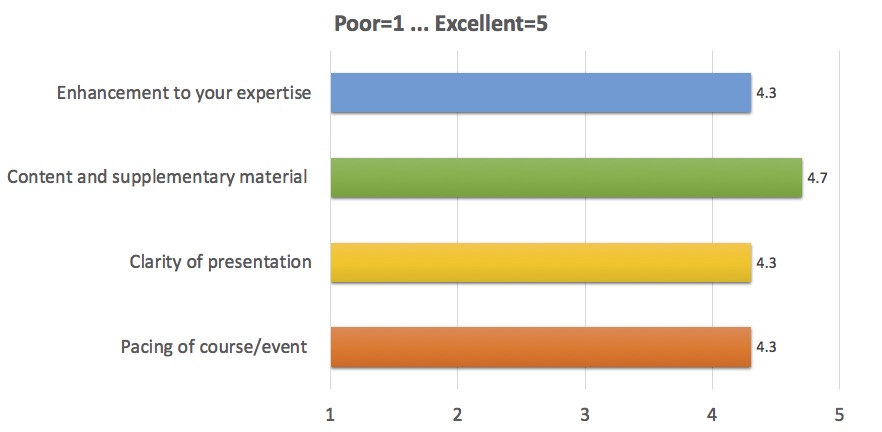
Use accessibility tools and support other teachers to do the same
I will be highlighting the videos to staff. We will each look at the immersive reader and look to input this into school staff training.
The videos for all of these webinars have been brilliant. This technology one was fantastic in showing where to find certain features.
I have found the discussion parts disappointing. Is it because there are so many people that nobody wants to talk? I know that affects my inclination to do so. So, I have found the actual webinars themselves a bit frustrating. When somebody presents something that feels a better use of time.
It has made me more aware and I will be mindful of the inclusive tools generally, even when creating training for colleagues, to ensure it is accessible
I found a lot of interesting information/advice and will definitely check these features out for myself and pass ideas on to colleagues and pupils
Use the tools!
Yes, I have asked all VI Specialists in Dundee to watch the two youtube videos and I hope to ensure that all the material we are putting out is accessible. We are hoping to support mainstream teachers to do this too. Straight afterwards I tried some of what I had learned - checking if a PPT presentation was accessible and I was able to make adjustments straightaway. I had not realised Microsoft had come so far as some of the tools have been upgraded since I last looked at them.
Hearing from practitioners about their experiences.
The interactivity in the comments. Some participants spoke, which was great. The video resources were also excellent.
The video beforehand.
The requirement to watch the videos then join the discussion gave it a great structure. We all gained some understanding of what the tools could do before joining the webinar so we could relate to practice for the discussion. Very useful ideas.
The chance to learn from others/find out new things which I can then research and investigate for myself.
Sharing with others.
The sharing of knowledge and expertise.
To have set presenters (although I appreciate that that would be much more work to organise and a different type of webinar).
Nothing.
I cannot remember.
Course Info Email from SSC: 4
Colleague: 2
Elizabeth McCann: 1
Developing pre-braille tactile skills, especially for older learners with acquired sight loss.
Everything that is rolling out just now is very appropriate. Every week I see the emails and think, "Oh, yes, that will be interesting!"
Screen readers for blind students.
Unsure at present.
Maybe more about children who have some sight.
Braille considerations for children in mainstream schools that are 'struggling'.
Accessible technology for Braille Users.
A webinar tailored to Heads of Service - Discussion around effective service delivery.
How was your experience of accessing the course via Collaborate? 4.4/5
How would you rate the webinar technology? 4.4/5
Comment came up quickly and the host was able to talk about them.
Maybe because the webinars are so popular now, with so many people, the sound is really poor, coming and going throughout the past few webinars. The general principle of the webinar is good though, and the option to put up hands to talk, see speakers, etc is good. With so many comments at the side, it can be difficult to keep up as the screen jumps up quite a bit when many people suddenly add comments.
We were instructed re procedures for use well from the start / I liked the 'Hand up' emoji as useful to indicate wanting to contribute.
It worked.

Opt out of Google Analytics cookies · Add/Update/Remove Your Contact Details · Privacy
©2020 Scottish Sensory Centre, Edinburgh